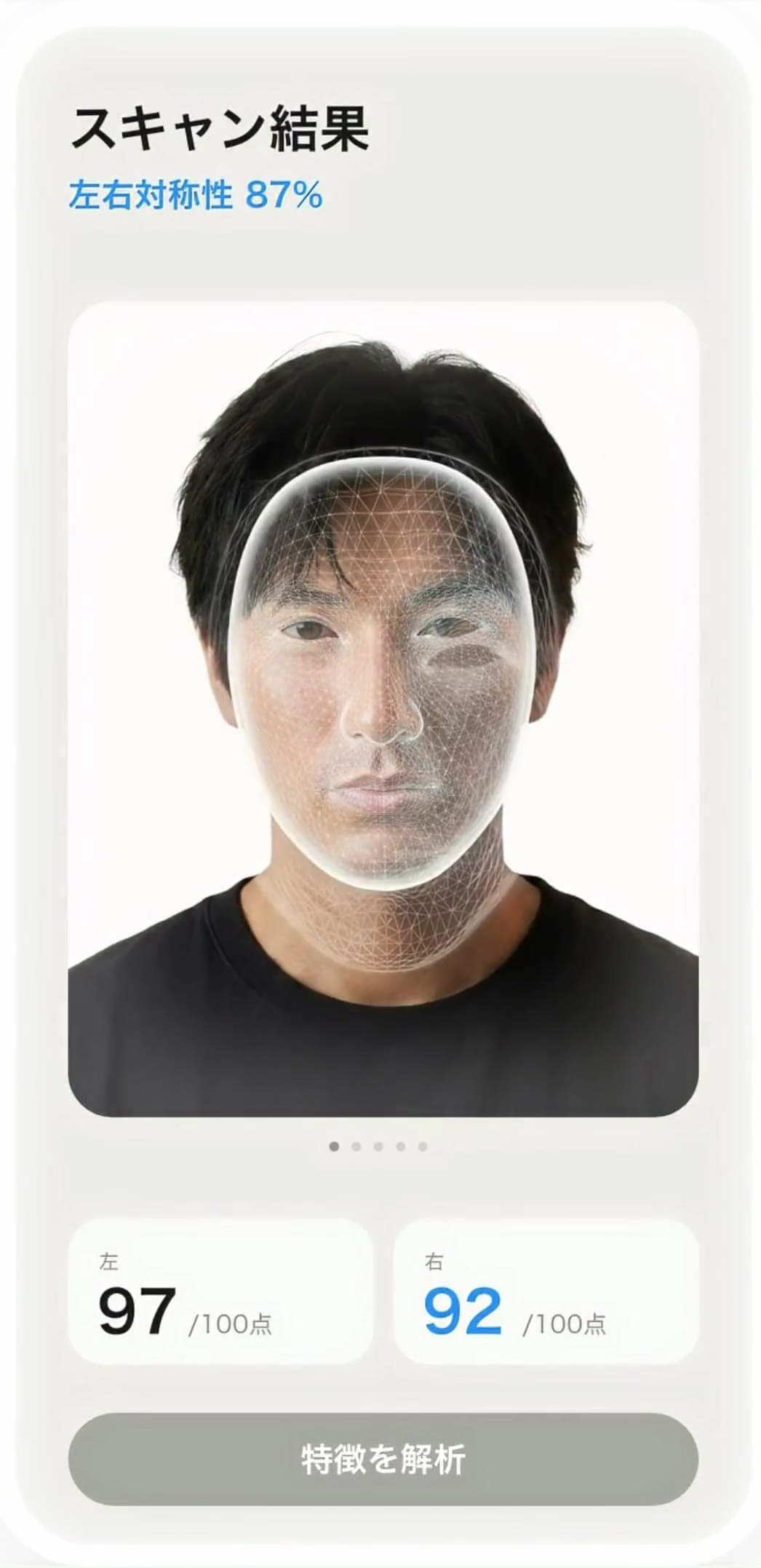
3D scan
13,000+ points across your face
The TrueDepth camera captures your face in three dimensions, so you can look at it objectively from any angle.
Scan your face in 3D with the TrueDepth camera on iPhone. BestFace measures where you have room to grow and turns it into a morning and evening routine of your own. What you put in shows up, in numbers, in the next scan.
Requires iOS 18.0 or later on an iPhone or iPad with Face ID (TrueDepth camera)
Your own face is the one face you can't see accurately. A mirror is reversed, and the more familiar a face becomes, the more your brain edits the differences out.
You have a rough idea of what bothers you. But a mirror never tells you what is off, or by how much.
A face barely moves in a day. Often it isn't that nothing is happening — it's that a mirror can't show you the difference.
Beauty advice is always written for someone else's face. The more of it there is, the harder it gets to decide what you should do today.
The task changes every day, the time it takes is unpredictable, and nothing feels like it accumulates. That's usually where it stops.
The parts that are hard to change, like bone, are only part of a face. Puffiness, posture, skin and left-right differences account for much of an impression — and those respond to habits. BestFace leaves bone structure alone and spends your time on what habits can actually move.
We measure the depth the TrueDepth camera returns and turn the shape of your face into figures. Changes you can't notice yourself stay on the record.
Of the areas habits can change, the app points at the one with the most room to grow right now — so you never wonder where to start.
The list is already decided. Follow the steps, check them off, done. Every day you do it adds to your streak.
 Day 1Week 7
Nothing to configure. Follow the guide, turn your head slowly, and the scan is finished.
 Keep your head straight
 Show your forehead and brows
 Take off your glasses
Line your face up with the on-screen guide and turn your head slowly. It takes about ten seconds.
You receive measurements for each area and your biggest growth area. You can spin your scanned face in 3D to check your profile and outline.
A morning and evening routine appears, built from your measurements and your answers. Follow the steps, check each one off, and you're done.
The next scan shows the difference from last time in numbers. Alongside your streak, everything you've put in stays on the record.
From measurement to daily actions, tracking, an AI coach and evidence-based reading — the tools for improving your face, in one place.
The TrueDepth camera captures your face in three dimensions, so you can look at it objectively from any angle.
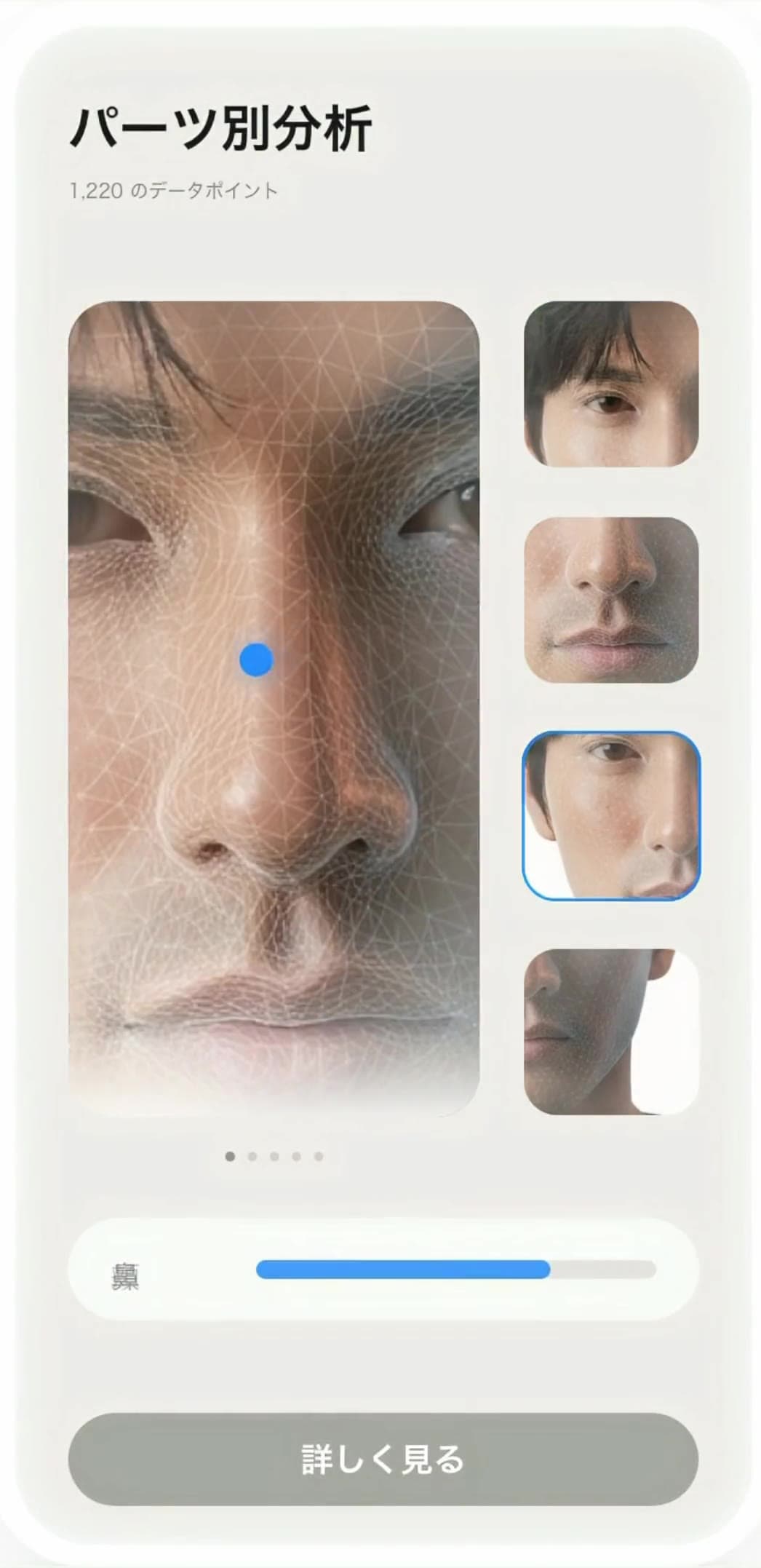
Eyes, nose, jawline, skin and more — each element that shapes your face is analyzed on its own.
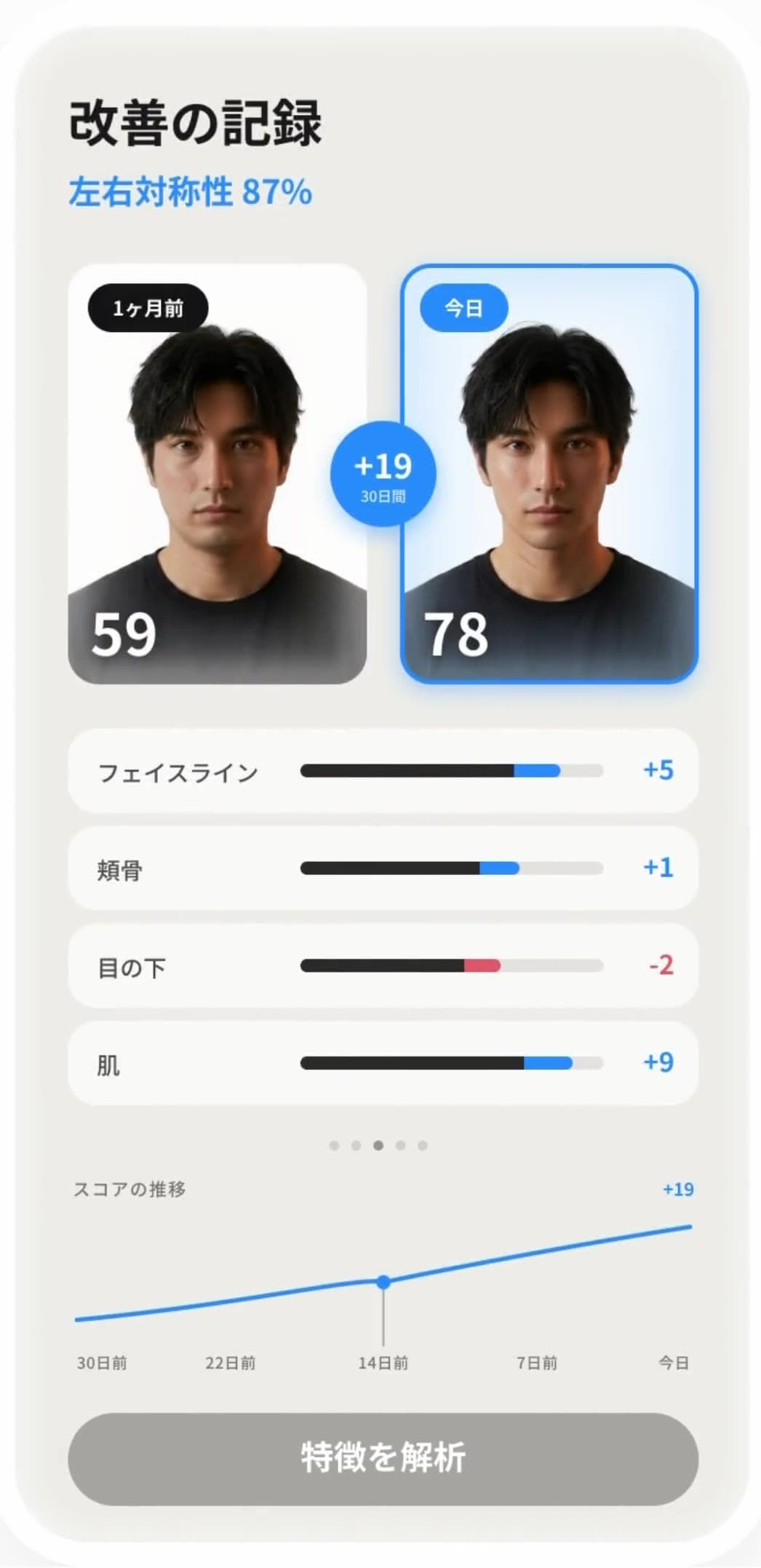
16 metrics, recorded with the same yardstick every time. See the difference from last time and the trend since day one.
A plan worked back from your concerns and your measurements, with evidence-backed facial exercises and demo videos.
See an image of your face seven weeks on, with the areas you can improve improved — a goal to keep going for.
The Glow-Up Report suggests three hairstyles and a brow shape that suit you.
An AI that knows your measurements and your concerns answers the question of what to do next.
Rather than inferring how a face looks from a single photo, BestFace measures the depth the TrueDepth camera returns. Scores come from a fixed calculation on your device, so the same scan always produces the same number.
We use ARKit's 1,220-vertex face mesh together with the raw TrueDepth depth map. Depth is denoised with a 3×3 median, and only frames where your head is still are collected.
The outer cheek and the edge of the jaw are only ever seen at an angle from the front, so we measure them while you're facing that way. That's why you turn your head slowly during the scan.
Overall and per-area scores come from a fixed calculation on your device. The AI writes the words, nothing else.
There are no rankings and no comparison with other users. Today's numbers become your baseline, and from the next scan on you look at the difference.
These 16 are measured values. A few further items are reference values, and the skin-related items are shown as reference values until their measurement is in place — the app marks them apart from measured values too.
From the methods out there, we pick only those that match your scan values and line them up as today's steps. What each method is based on is always there to read inside the app.
Each exercise in your routine carries the research it draws on. Open one to read the steps and the evidence behind it.
Puffiness, posture, facial muscles, how skin looks, left-right differences. We make no claim that bone structure changes.
No need to collect and compare advice. Everything is ordered for you, matched to your measurements.
What the app publishes is general information. For anything concerning symptoms or treatment, please consult a physician or dentist.
A face is the last thing anyone wants to hand over. So here is exactly what happens where.
Both the geometric measurement and the score calculation run entirely on your iPhone. Nothing waits on a server to decide.
The AI features use third-party AI services (Anthropic and Google), and the app shows you what will be sent and to whom before asking for your consent. The coach receives only numbers, your answers and what you type. Your front-facing photo is sent only to create the 7-week face image and the Glow-Up Report. Your 3D mesh is never sent.
Your scans are never used to train a model. If you sign in, your data is stored in an area only you can access.
Choosing "Delete all data and close account" in your profile removes what's on the device and what's on the server together.
It will not change your bone structure. BestFace only works on what actually moves: puffiness, posture, facial muscles, the impression your skin gives, and left–right differences. For anything involving bone structure or tooth alignment, please consult a physician or dentist.
An iPhone or iPad with a TrueDepth camera (Face ID), running iOS 18.0 or later. Scanning relies on that camera to measure facial depth, so devices without TrueDepth — Touch ID-only models, for example — cannot use the scan.
All facial measurement and score calculation happens inside your iPhone. Only when you are signed in, and so your history can move with you to a new device, the metrics JSON, the 3D mesh (.obj), and a front-facing photo (.jpg) are stored in a folder of your own on Firebase. Access controls mean only your account can read that folder.
Yes. If you do not sign in, your scan results are saved only on your device and nothing is stored on the server. The trade-off is that your history cannot be carried over when you change devices or reinstall the app.
Use "Delete all data and close account" in your profile to remove both the data on your device and the data on the server in one step. Deleting the app alone leaves the server-side data in place. Please also note that deleted data cannot be restored.
Start by taking a single scan and putting today's numbers on the record. The one you're measured against is yesterday's you.
Requires iOS 18.0 or later on an iPhone or iPad with Face ID (TrueDepth camera)